European Accessibility Act: What Shopify Merchants Need to Know
The European Accessibility Act (EAA), Directive (EU) 2019/882, has applied to covered services since 28 June 2025. E-commerce services are on the European Commission's list of covered services, so a Shopify store that sells to consumers may well be affected. Whether yours is depends on the facts, and this guide helps you work that out.
Below you get a European Accessibility Act checklist for Shopify stores in the order you would use it: screen your scope, check each area of the store, walk the buying journey, review your apps, look at the information you provide, test properly, then prioritise and retest. There is also a printable readiness table near the end. It is a working document, not a compliance certificate. If you want help instead of a do-it-yourself review, our European Accessibility Act compliance service covers the same ground.
Does the European Accessibility Act Apply to Your Shopify Store?
Work through five questions. This is a scope-screening guide, not a legal determination.
- Do you offer an e-commerce service to consumers in the EU? The Directive defines e-commerce services as services provided at a distance, through websites and mobile apps, at the individual request of a consumer and with a view to concluding a consumer contract. An ordinary online store fits that description.
- Which legal entity provides that service? The business that contracts with the customer is the one whose status matters, which may not be the brand name on the storefront.
- Does the service fall within the EAA's scope? Check it against the Commission's list of covered services and the Directive itself.
- Could the microenterprise exemption apply? Microenterprises providing services are exempt. The Directive defines a microenterprise as having fewer than 10 persons and an annual turnover or balance sheet total of no more than EUR 2 million. Company relationships and your specific circumstances can matter, so do not assume every small store qualifies.
- Which national law applies? The Act is a directive. Each member state transposed it, so enforcement bodies, procedures and penalties differ by country.
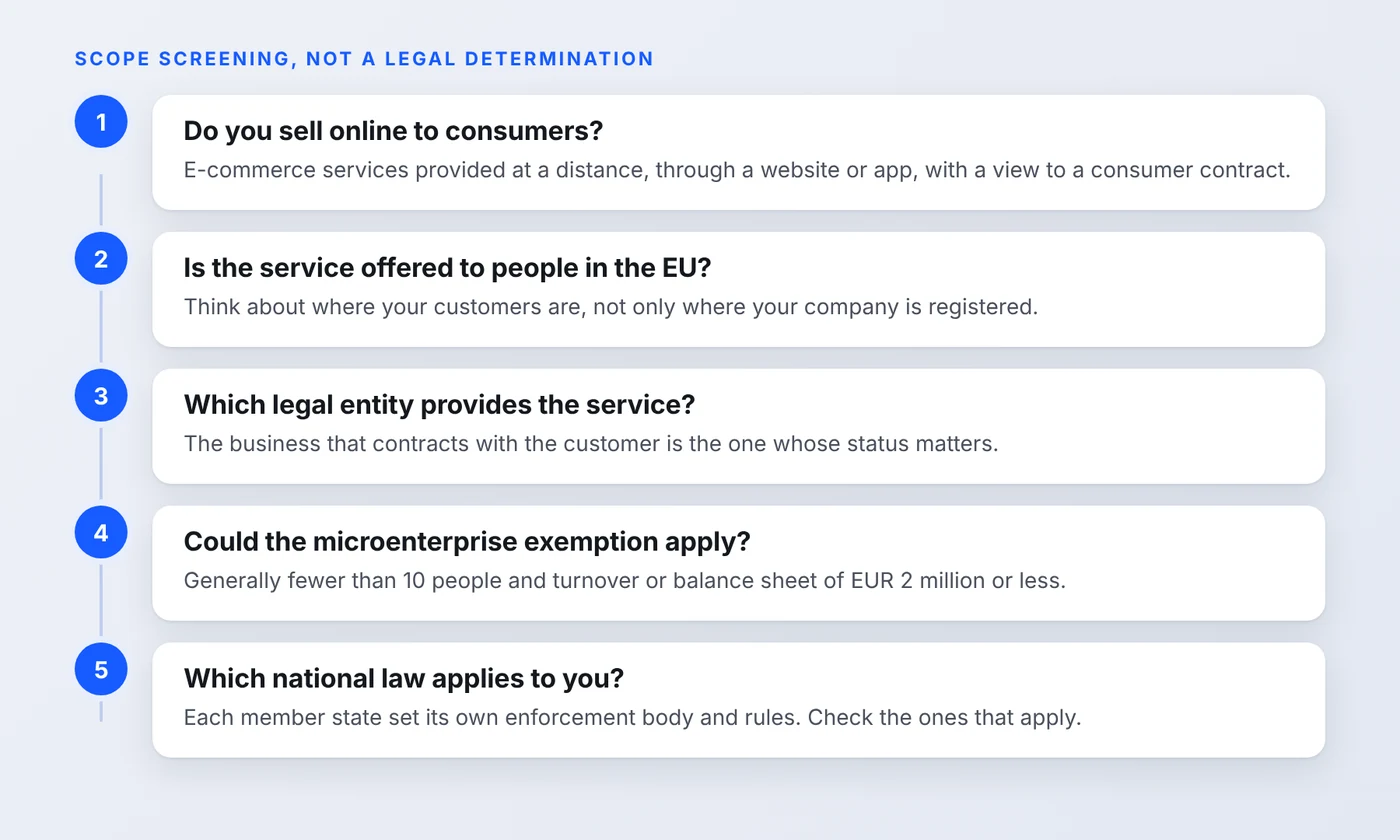
A store's country of establishment alone is not enough to settle the question, so a business outside the EU should look at where its customers are. Read the European Commission's page on the Act and the text of the Directive on EUR-Lex, and confirm the result with legal advice. Our service page on EAA compliance for ecommerce goes into who is in scope and how the exemptions work in more detail.
Shopify EAA Accessibility Checklist
Use the table as a working document. Each row names a part of the store, what to check and a typical failure so you know what you are looking for. Set the status as you go.
| Store area | What to check | Example of a failure | Status |
|---|---|---|---|
| Theme and layout | Semantic headings, logical reading order, zoom and reflow | Heading levels chosen for size, so a screen reader user cannot scan the page | Not started / In progress / Done |
| Product images | Useful alternative text for informative images, decorative images handled appropriately | Every photo has the product name as alt text, so front and back views sound identical | Not started / In progress / Done |
| Colour and text | Text contrast, visible focus, readable text, meaningful visual cues | Light grey sale price on white, or a selected size shown by colour alone | Not started / In progress / Done |
| Navigation | Keyboard access, visible focus, menus, search and filters | A mega menu that opens on hover only | Not started / In progress / Done |
| Product selection | Variant selectors, quantity controls, buttons and labels | Swatches that a screen reader announces only as "button" | Not started / In progress / Done |
| Forms | Labels, instructions, error messages and recovery | Placeholder text used instead of a label, and errors shown only in red | Not started / In progress / Done |
| Cart and checkout | Keyboard operation, focus behavior, accessible identification, security and payment functionality | A cart drawer that leaves keyboard focus behind the page | Not started / In progress / Done |
| Apps and widgets | Popups, reviews, subscriptions, chat, cookie banners and other third-party UI | A popup that cannot be dismissed with the keyboard | Not started / In progress / Done |
| Accessibility information | Clear, accessible information about the service and its accessibility | Information that exists only as an image, or is hard to find | Not started / In progress / Done |
| Testing and records | Test results, issues, fixes, retesting and review dates | Fixes made with no record of what was tested or when | Not started / In progress / Done |
The row on product images connects to our guide on adding alt text to Shopify product images, and the row on product selection to the walkthrough in Shopify product page accessibility. For a longer list of the issues that come up most often, see common WCAG issues on Shopify stores and our Shopify WCAG compliance page.
A note on standards (checked 24 October 2026)
Do not read this guide as saying the EAA legally requires WCAG 2.2 AA for every store. WCAG is the main technical reference for web accessibility, and the European standard EN 301 549 is the reference used for the EAA. The current reference version is based on WCAG 2.1 Level AA. EN 301 549 V4.1.1 was published in September 2026 and updates the web clauses to WCAG 2.2. According to the AccessibleEU notice, it is not yet the legal reference for showing compliance until the Commission cites it in the Official Journal. Testing against WCAG 2.2 Level AA is a sound way to prepare, but confirm the current status and your national requirements before relying on any one version.
How to Test the Shopify Buying Journey
Accessibility problems on a store cluster along the path to purchase, so test in that order: homepage, collection or search, product, variant selection, add to cart, cart, checkout, payment and identification, then the confirmation. At each step ask the same questions.
- Can you reach and operate every control with a keyboard?
- Is focus visible and in a sensible order?
- Are labels and selected states announced appropriately by a screen reader?
- Are form errors understandable and recoverable?
- Does a popup or cart drawer disrupt focus?
- Can you finish the purchase using the accessibility features available to you?
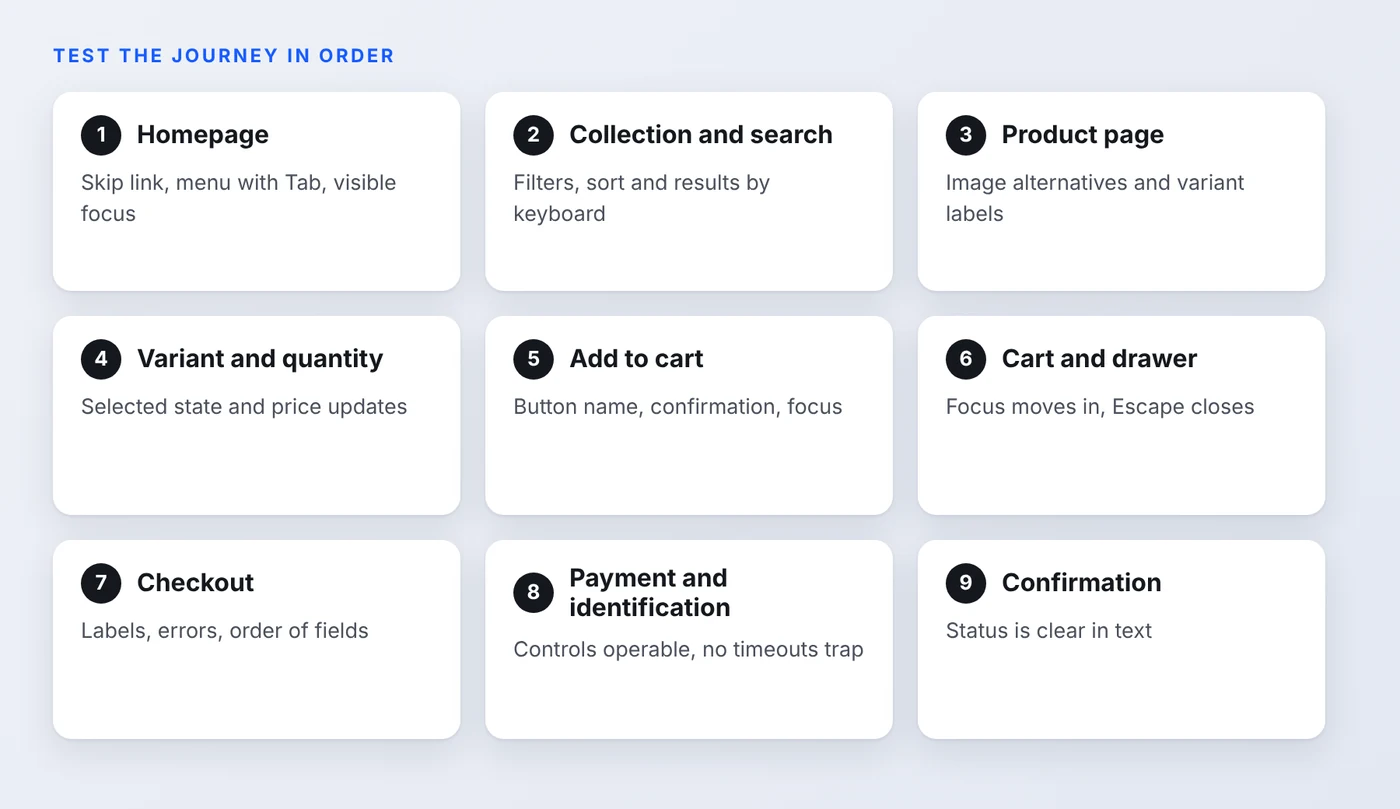
Be precise about checkout. On Shopify, much of the checkout is platform managed, so a merchant has limited control over some of its behavior. That does not mean the journey can be ignored. You still control the cart, the theme, the apps that load before checkout, any customizations available on your plan and the information you give customers. Test the whole path, record what you find, and raise platform problems with Shopify. Our Shopify checkout accessibility page covers this in more depth, and so does the guide to fixing checkout keyboard navigation.
How Shopify Apps Can Affect Accessibility
What a shopper sees is the theme, the content you add, the output of every app and any custom code. Apps are often the least visible source of problems because they inject their own interface. These are examples of failures to look for, not claims that any named app has them:
- A popup that cannot be dismissed with the keyboard, or that traps focus.
- A review widget with unlabeled controls or star ratings that read as nothing.
- A subscription selector that does not communicate which option is selected.
- A cart drawer that leaves keyboard focus behind or sends it to the wrong place.
Test each app individually, on the pages where it appears, before and after updates. If an app fails, ask the vendor for a fix, configure it differently, or replace it. See our guide to Shopify apps and accessibility for the categories that cause the most trouble, and why a widget cannot fix them.
What Accessibility Information Should Your Store Provide?
The Directive asks service providers to prepare information on how the service meets the accessibility requirements, and Annex V sets out what that information covers. Article 13 says it should be made available to the public, including in an accessible form. Recital 81 explains that, for services, the information can be given in the general terms and conditions or an equivalent document.
That is different from saying every business must publish an identical accessibility statement. National implementation can vary, so verify what applies to your service. In practice, a clear and accurate page linked from the footer and referenced in your terms is a sensible way to give customers the information, as long as it is readable with assistive technology and says only what is true. Our guide to the Shopify accessibility statement has a template with placeholders, and you can see a real example in our own statement.
Automated Scans vs. Manual Accessibility Testing
Automated tools are fast and useful. They find missing alt text, some contrast failures and some labelling problems. They do not judge whether a cart drawer manages focus, whether a screen reader announces a price change, or whether the buying flow makes sense, and they cannot establish complete conformance on their own.
A sound approach combines four layers: automated checks, keyboard testing, screen reader testing and expert evaluation sized to the store. The W3C's WCAG-EM evaluation methodology is a useful way to scope an evaluation, choose a representative sample of pages and report results. Our comparison of automated and manual testing goes into the trade-offs, and the Shopify accessibility audit page shows what a manual review involves.
How to Prioritise and Retest Accessibility Issues
You will probably find more issues than you can fix in a week. Sort them by:
- User impact. Does it block someone from finishing a task, or only make it harder?
- Functionality affected. Problems on the path to purchase come before problems on a rarely visited page.
- Frequency. A flaw in a shared template or a header repeats on every page.
- Dependencies. Some fixes need a theme change, an app update or a vendor, so plan them early.
If you label findings Critical, High or Medium, say that these are your own practical categories. WCAG itself does not define severity levels. A simple routine keeps the work honest: identify the issue, document it with the page and steps, fix it, retest it, and record the date and result. For an idea of what a useful written report contains, see our accessibility audit report example.
Printable EAA Readiness Checklist
Copy this table into your own document and fill it in. It is a readiness checklist, not a legal compliance certificate. The right scope and requirements depend on the service you provide.
| Check | Status | Evidence / notes |
|---|---|---|
| Store scope and applicable requirements reviewed | Not started / In progress / Done | |
| Homepage and navigation tested with keyboard | Not started / In progress / Done | |
| Search, filters and product options tested | Not started / In progress / Done | |
| Product image alternatives reviewed | Not started / In progress / Done | |
| Form labels and error handling checked | Not started / In progress / Done | |
| Cart and checkout journey tested | Not started / In progress / Done | |
| Third-party app interfaces reviewed | Not started / In progress / Done | |
| Accessibility information reviewed | Not started / In progress / Done | |
| Findings documented and prioritised | Not started / In progress / Done | |
| Fixes retested and recorded | Not started / In progress / Done |
Need help assessing your Shopify store for EAA accessibility issues?
AccessoraX can help you review your storefront, identify accessibility barriers, document findings and plan Shopify-focused remediation.
Explore our European Accessibility Act compliance serviceFrequently Asked Questions
Does the European Accessibility Act apply to Shopify stores?
It can. The Act covers e-commerce services provided to consumers, and a Shopify store that sells to consumers is one way of providing such a service. Whether your store is in scope depends on who your customers are, which legal entity provides the service and whether an exemption applies. Treat the scope questions in this guide as a screening step and confirm the answer with qualified legal advice.
Does the EAA apply to a Shopify store based outside the EU?
A store's country of establishment is not enough to answer this. The Directive looks at services provided to consumers, so the key question is whether you offer your service to consumers in the EU. How national laws treat businesses outside the EU can vary, so check the rules of the countries you sell to.
Are small Shopify businesses exempt from the EAA?
Only microenterprises providing services are exempt. The Directive defines a microenterprise as an enterprise with fewer than 10 persons and an annual turnover or balance sheet total of no more than EUR 2 million. Company relationships and the facts of your case can matter, so a small store is not automatically exempt.
Does Shopify automatically make my store EAA compliant?
No. Shopify provides the platform and publishes accessibility guidance for themes, but the merchant controls the theme choice, customizations, apps, content and product data. Those can introduce barriers, so your own store needs testing.
Does the EAA require WCAG 2.2 AA?
Not in so many words. The EAA is outcome based, and the European standard EN 301 549 is the reference for web content. The current reference version is built on WCAG 2.1 Level AA. EN 301 549 V4.1.1, published in September 2026, moves to WCAG 2.2, but it had not yet been cited in the Official Journal as the legal reference at the time of writing. WCAG remains the practical technical benchmark. Check the current status before relying on either version.
Does my Shopify store need an accessibility statement?
The Directive requires service providers to prepare and publish information on how the service meets the accessibility requirements, and it says this can sit in the general terms and conditions or an equivalent document. It does not use the phrase accessibility statement for online stores, and national implementation can differ. A clear, accurate page is a sensible way to provide the information. Our guide to the Shopify accessibility statement has a template.
Can an accessibility widget make my Shopify store compliant?
No. A widget adds a layer on top of your pages. It does not repair the underlying theme or app code, and it cannot establish that your store meets the requirements. Fixes belong in the code and content.
Can an automated accessibility scan prove EAA compliance?
No. Automated tools find some issues quickly, but they cannot judge many interactions, such as whether a cart drawer handles focus properly. A scan is a starting point, not evidence of conformance.
Which Shopify pages should I test first?
Start with the path to purchase: a product page, the cart and the checkout, then the homepage, navigation and search. Third-party app interfaces that appear on those pages, such as popups, reviews and chat, should be tested at the same time.
Related reading
Last updated: 24 October 2026. General information, not legal advice. The European Accessibility Act is implemented through national law, so details differ between member states, and a scan, a widget or an accessibility page does not guarantee compliance. Figures and standards status were checked against official EU sources on the date shown, so confirm them again before you rely on them.