A shopper who uses a screen reader opens your product page, and the size picker will not respond to the keyboard. They want to tell someone, so they scroll to the footer and look for a way to reach you. Either they find a page that says what you know about, what you are doing about it and where to write, or they find nothing and leave. A Shopify accessibility statement is that page.
This guide covers what the statement is, what to put in it, a template you can edit, how to set up reporting, and the mistakes that make a statement unreliable. One caution before we start: a statement describes your approach and your known limits. It does not make your store accessible, and it does not by itself show legal compliance.
What Is a Shopify Accessibility Statement?
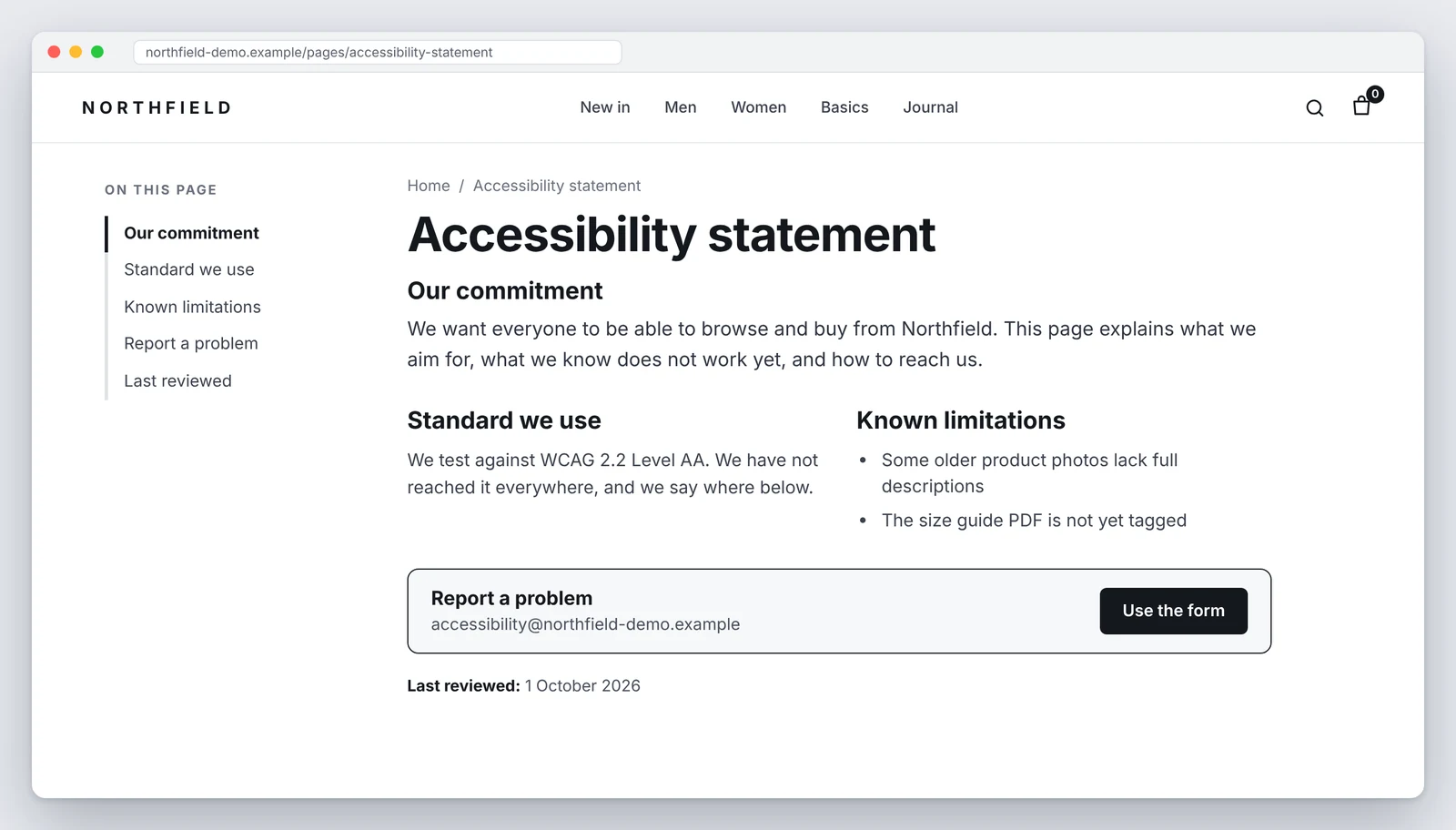
An accessibility statement is a public page that tells visitors how accessible your site is, what you are doing to improve it, and how to contact you when something does not work. The W3C Web Accessibility Initiative describes statements as being mainly for users, who usually read them when they run into a problem. Its guidance on accessibility statements lists a pledge, the standard you applied and contact details as the minimum.
On Shopify the statement is usually an ordinary page in your store, linked from the footer. It is not a Shopify feature or a setting. You write it, you keep it accurate, and you are responsible for what it says.
Why Shopify Stores Need an Accessibility Statement
No statement fixes a broken page. There are still good reasons to publish one.
- It gives people a route to you. Many shoppers who hit a barrier would rather tell you than abandon the cart in silence. You also hear about problems your own testing missed.
- It sets honest expectations. A list of known limitations lets someone plan around a problem, for example by phoning an order in.
- It shows the work is ongoing. A dated statement with specific details reads very differently from a vague promise.
- Some rules ask for information. The European Accessibility Act expects in-scope businesses to give customers accessibility information, and some public sector rules require a formal statement. In the US, the ADA does not prescribe one. Rules differ by country and business type, so confirm yours with a qualified adviser. Our European Accessibility Act guide and the EAA checklist for Shopify stores cover the EU side.
What to Include in an Accessibility Statement
The W3C lists three things as the minimum and several more as advisable. For a Shopify store, a practical structure looks like this:
- A short commitment. One or two plain sentences. Skip slogans.
- The standard you use. Name it, for example WCAG 2.2 Level AA, and say honestly how far you have got: not yet assessed, partly meets, or meets on the pages you tested.
- How you tested. What you actually did and when. Automated scans, keyboard checks of the product page, cart and checkout, a screen reader review, or an outside audit.
- Known limitations. Specific problems, the pages they affect, and any alternative you offer. Mention parts run by third parties, such as a review tool or booking widget.
- How to report a problem. An email address, and a form or phone number if you can staff them. Say what to include.
- A date. When the statement was prepared and last reviewed.
The W3C also offers an accessibility statement generator if you want a guided start. Treat its output as a draft and replace anything that does not match your store.
For a real example, see the statement for this website. It says the site is partially conformant, lists what was tested and when, and names its known limitations.
Shopify Accessibility Statement Example: An Editable Template
Everything in square brackets is a placeholder. Delete what you cannot support. Do not leave in a sentence about testing or conformance unless it is true for your store today.
A few notes on filling it in. Choose the conformance sentence last, after you have tested. Name real dates. If you have no phone line, leave the phone number out rather than listing one nobody answers. And only promise a reply time you can keep.
How to Report an Accessibility Issue
The reporting route is the most useful part of the page, so make it easy. Offer more than one way if you can: an email address that a person reads, and optionally a short form. People who cannot use a mouse, or who rely on a screen reader, will not all choose the same method.
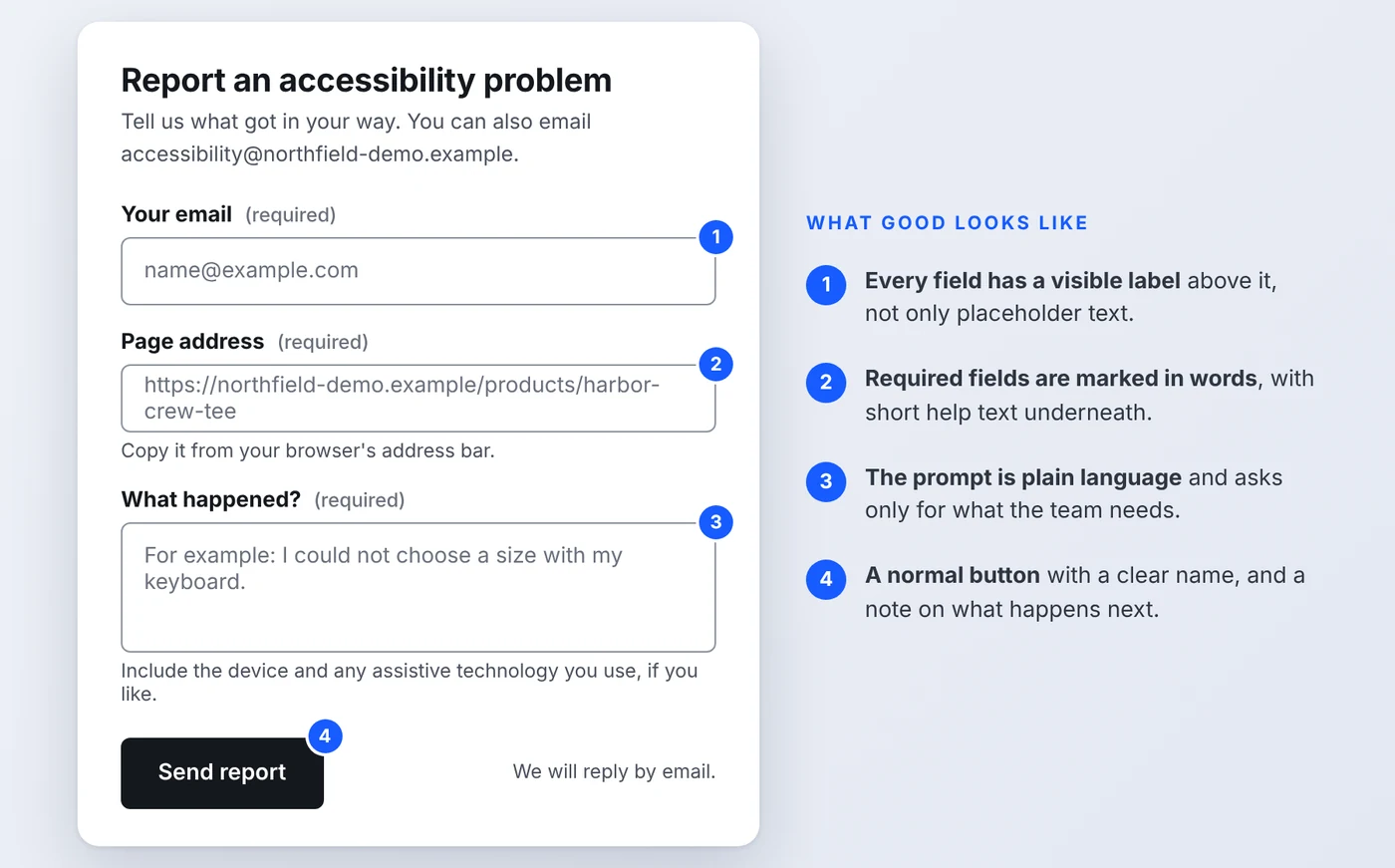
If you add a form, hold it to the same standard as the rest of the store:
- Give every field a visible label, not only placeholder text that disappears when someone types (WCAG 3.3.2 Labels or Instructions).
- Mark required fields in text, not by color alone.
- Describe errors in words and say how to fix them.
- Keep it short. Email, page address and a description is usually enough.
- Show a clear confirmation after sending, and answer the report.
Then answer what you receive. A reporting address that nobody monitors is worse than none. Log each report, fix what you can, and tell the person what happened.
Common Accessibility Statement Mistakes
| Mistake | Why it causes trouble | Better approach |
|---|---|---|
| Claiming "fully compliant" or "100% accessible" | Almost no store can support this, and an automated scan cannot show it. A shopper who hits a barrier will not believe you. | State your standard and how far you have reached, with the pages tested. |
| Copying another store's text | It describes testing and limits that are not yours. | Use a template for structure and write your own facts. |
| No contact method, or one nobody reads | People cannot report barriers, so you never learn about them. | Give an email address a person monitors and reply to every report. |
| Never updating it | An old date and fixed problems still listed show the page is neglected. | Review after major changes and at least every six months. |
| Vague wording like "we do our best" | It tells a reader nothing about what works or what does not. | List specific limitations and what you offer instead. |
| Publishing the statement as an image or PDF | It may be unreadable with assistive technology, or hard to find on a phone. | Use a normal page with real headings and text. |
| Treating the statement as the fix | The page does not change how your product, cart or checkout behave. | Test the store itself and fix what you find. |
The first mistake deserves extra care. Broad claims you cannot back up can mislead customers, and they invite scrutiny if a complaint arrives. This is general information, not legal advice. If you are unsure how to word your status, ask a qualified adviser.
How to Review Your Shopify Store for Accessibility Issues
Your statement is only as good as the testing behind it. A realistic review has three layers:
- Automated scan. It finds some issues quickly, such as missing alt text or low contrast. It cannot confirm that a store works for people.
- Keyboard check. Tab through the product page, cart and checkout. Can you pick every option, see where focus is and complete a purchase?
- Screen reader check. Listen to the key journeys. Are buttons and options named, and are updates announced?
Work through our Shopify WCAG compliance checklist for the criteria to test. For the most important page in the store, follow the steps in our guide to Shopify product page accessibility, which covers variant selectors, images and the add-to-cart button. To see what a useful written report looks like, read our accessibility audit report example.
Write down what you find, with dates. That record is what lets you say "partly meets" in your statement and mean it, and it gives you the list of known limitations to publish.
Want to know what your statement should say?
A Shopify accessibility audit gives you tested findings, evidence and fixes, so your statement describes what is actually true about your store. Start with a free scan, or ask for a full audit.
Request a Shopify accessibility auditFrequently Asked Questions
Does my Shopify store need an accessibility statement?
It depends on where you sell and who you serve. Some rules, such as the European Accessibility Act for in-scope businesses, ask you to give accessibility information to customers. The ADA does not itself prescribe a statement. Even where nothing requires one, a statement gives customers a way to reach you, so it is worth publishing. Check your own obligations with a qualified adviser.
Where should I put an accessibility statement on Shopify?
Create a normal page in your Shopify admin under Online Store, Pages, and link it from the footer menu so it appears on every page. Use a plain URL such as /pages/accessibility. Keep it as regular page content, not an image or PDF, so it works for everyone.
Can I copy another store's accessibility statement?
No. A statement only works if it describes your store. Copying wording about testing you have not done, or a standard you have not measured against, makes the page inaccurate. Use a template for the structure and fill in your own facts.
Does an accessibility statement protect me from a lawsuit?
No. A statement tells people about your approach and known limits. It does not make your store accessible and it does not establish legal compliance. An inaccurate statement can make things worse, so keep every claim in it true and specific.
What if my store is not fully accessible yet?
Say so. A statement that names real limitations and says how people can get help is more useful and more believable than one that claims everything works. List the known problems, describe the alternative you offer, and update the page as you fix things.
How often should I update the statement?
Review it after any major change to your theme, apps or checkout, and at least every six months. Update the last reviewed date only when you have actually reviewed the content, not as a routine edit.
Related reading
Last updated: October 2026. General information, not legal advice. The store and screenshots in this article are illustrations from a fictional test page. An accessibility statement describes your approach and known limits. It does not make a store accessible or establish legal compliance.