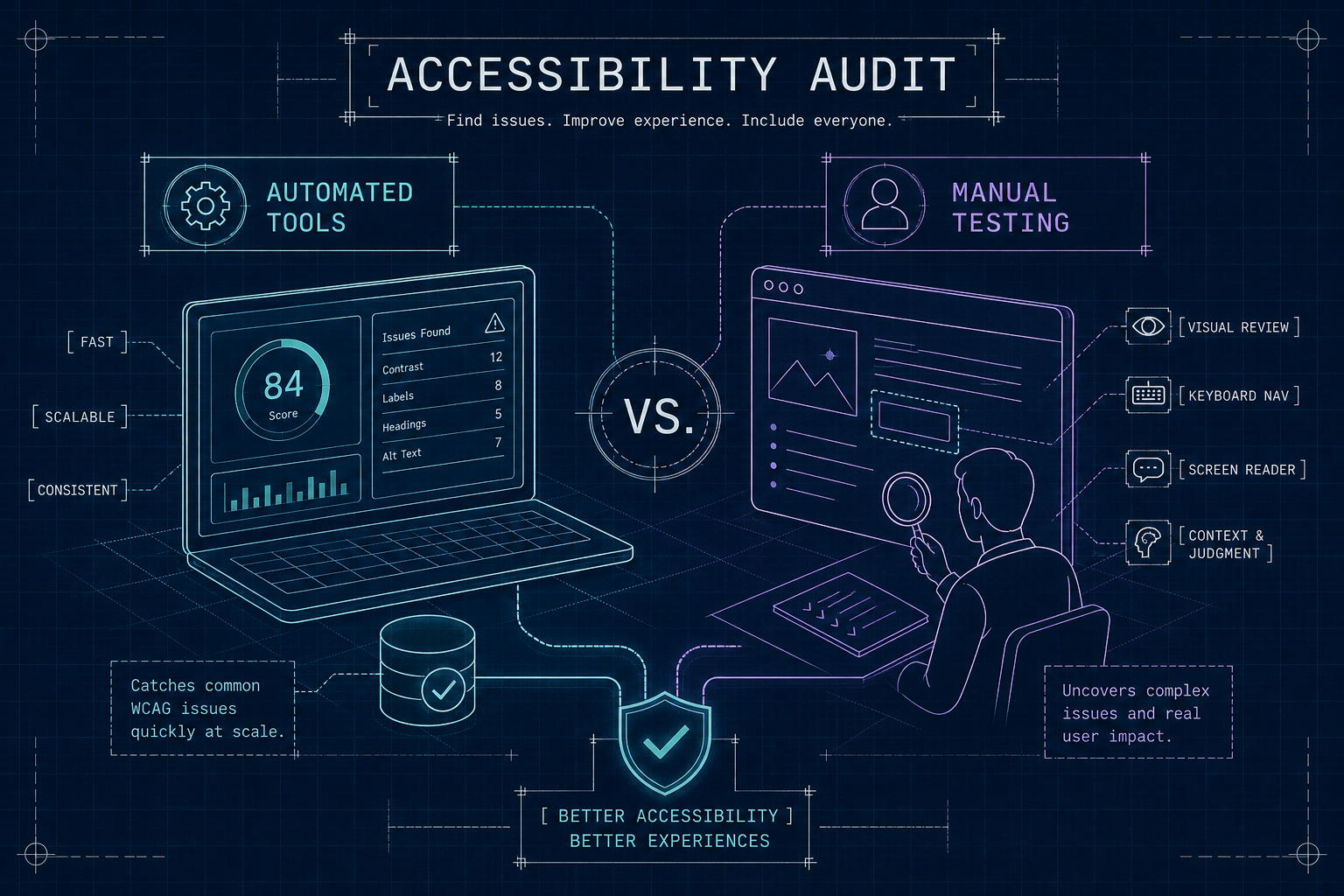
You run Lighthouse. You get a score of 88. You move on. This is how most accessibility audits end, and it is also how most of them fail. A proper web accessibility audit does more than return a Lighthouse score, it tests real user flows with assistive technology and uncovers the barriers that scanners are structurally incapable of detecting. The score feels like a verdict. It is not. It is a snapshot of the fraction of problems a scanner can catch, and that fraction is smaller than most teams realize.
At AccessoraX, we audit Shopify stores exclusively, and the gap between what automated tools flag and what users with disabilities actually encounter is consistent across every store we review. A store can pass every automated check and still trap a keyboard user in the checkout flow. It can score well on contrast and still have screen readers narrating decorative images aloud in confusing sequences. The tools are not lying. They are just answering a narrower question than the one you think you are asking.
What a Web Accessibility Audit Actually Covers
The Real Coverage Ceiling of Automated Tools:
Automated tools reliably catch roughly 30% of WCAG violations. That ceiling exists for a structural reason. Scanners check the DOM for binary, measurable conditions: is an alt attribute present, does this color contrast ratio fall below 4.5:1, is this ARIA role a valid value? These are rule-based checks. They produce numbers fast. But they cannot evaluate whether alt text is actually useful, whether a focus sequence makes logical sense through a page, or whether a modal traps keyboard users in the cart drawer.
The problem is not the tools themselves. axe DevTools, WAVE, and Lighthouse all cover the detectable end of the WCAG spectrum competently. They catch missing alt attributes, low-contrast text, invalid ARIA, and basic semantic HTML problems. They belong in every development workflow. The problem is treating a passing score as a compliance verdict. A Lighthouse score of 90 does not mean 90% of accessibility barriers are resolved. It means 90% of the things Lighthouse checks are passing, which is a much smaller set.
See Your Store Through Your Customers' Eyes
AccessoraX's free audit gives you a personalized walkthrough of your homepage accessibility. See exactly what screen readers encounter, no automated score, no vague report.
Get Your Free AuditWhy Manual Testing Closes the Gap
The Issues That Require Human Judgment
Manual testing covers the majority of WCAG failures because most accessibility problems require context to evaluate. A screen reader needs to interpret whether a form error message is associated with the right field, not just whether a label tag exists somewhere on the page. A keyboard-only user needs focus to travel in a logical order through the interface, not just land somewhere focusable.
Automated tools cannot simulate intent. They cannot tell you that a "Skip to content" link anchors to the wrong element, or that a dropdown traps keyboard focus and refuses to release it. These are among the most disorienting barriers real users encounter, and no a11y audit tool or automated scanner can substitute for human navigation with assistive technology.
Core Techniques in a Real Manual Audit
A thorough manual accessibility assessment requires several distinct testing passes:
- Keyboard-only navigation through every interactive element verifies that nothing requires a mouse
- Screen reader walkthroughs using NVDA on Windows and VoiceOver on macOS expose how assistive technology interprets page structure
- Focus order verification confirms logical tab sequences
- ARIA landmark and role review catches semantic errors
- Form and label association testing verifies proper connections
- Color contrast checks beyond what scanners surface add another layer
Each technique exposes a different category of barrier, and running all of them across primary user flows, not just the homepage, is what separates a real web accessibility audit from a checkbox exercise.
The Most Common Failures a Thorough Audit Surfaces
High-Frequency, High-Impact Issues:
Data from WebAIM's Million study shows low-contrast text affects over 80% of homepages tested. Missing or useless alt text, improper heading structure, and unlabeled form fields follow closely. These are issues automated tools partially detect, but the version found manually is usually more severe: a decorative image with a verbose alt description narrated by a screen reader, a heading styled as a div so scanners never flag it, a placeholder used as the sole label that disappears the moment a user starts typing.
Forms are a persistent failure point. Missing programmatic labels, vague error messages, and checkbox groups without group context make checkout flows actively hostile to screen reader users. These issues are not subtle. They prevent task completion entirely, and a scanner will often report the field as labeled because a visible text node is present nearby, even when the association is not programmatically established.
Issues Scanners Miss Entirely
Keyboard traps, illogical focus order, misleading ARIA roles, and inaccessible modals are almost never caught by automated scans. ARIA misuse is particularly common and particularly hard to automate. A button marked without the matching dialog role creates a broken expectation in screen readers that a scan will report as valid markup. A skip link that passes a syntax check but anchors to the wrong element reads as functional to a scanner and non-functional to a user.
How to Run a Web Accessibility Audit in Stages
Setting Scope and the Right WCAG Standard
In 2026, WCAG 2.1 Level AA is the legally operative standard for e-commerce in the United States. Courts have consistently applied it as the compliance baseline under ADA Title III for private businesses. WCAG 2.2 represents forward-looking best practice and is worth adopting, but 2.1 AA is where legal scrutiny currently lands.
Scope your audit against a representative set of page templates rather than every URL. For an e-commerce site, that means homepage, product listing, product detail page, cart, checkout, and any form-heavy pages such as account creation or contact forms. Testing every URL is impractical. Testing every distinct template is essential, because a single structural problem in a template replicates across every page that uses it.
Running the Audit in Phases
A structured web accessibility audit runs in three phases:
- Automated scanning to collect the measurable baseline: contrast ratios, missing attributes, invalid markup
- Manual testing with keyboard and screen reader across all scoped templates and user flows, including edge states like form validation errors and modal dialogs
- ARIA and semantic structure review at the code level to catch misuse that neither phase one nor page-level navigation would surface
Each phase feeds findings into a severity-ranked report: critical issues that block users entirely, high-priority issues that degrade the experience significantly, and medium or low issues that reduce usability without preventing access.
How a Shopify-Specific Audit Goes Deeper
The Layers a Generic Audit Misses
Platform-aware auditing matters because Shopify stores are not generic HTML sites. They are built on Liquid templating with third-party apps injecting scripts, dynamic cart drawers managing their own focus states, and payment integrations that replace standard checkout form elements. An automated scan of the storefront catches surface-level issues. It does not inspect how the cart drawer handles focus when opened, whether the payment step traps keyboard users on the address field, or whether app-injected content inherits broken ARIA from its source component.
What AccessoraX Audits That Generic Tools Skip
A Shopify audit means opening the Liquid theme files directly, not just reviewing the rendered output in a browser. We test keyboard navigation through the full checkout flow: add to cart, cart drawer, checkout initiation, address entry, payment selection, and order confirmation. We test with NVDA on Chrome and VoiceOver on Safari because they interpret the same markup differently, and a fix that works in one can fail in the other. When a keyboard trap exists in Shopify's payment integration, we document exactly where in the Liquid stack it originates and what native code change resolves it permanently.
Why Overlay Widgets Cannot Replicate This:
An overlay script runs on top of the rendered page. It has no visibility into the Liquid files, no ability to fix focus management in a cart drawer component, and no way to correct a broken ARIA pattern inside a third-party payment app. It wraps the problem rather than solving it.
Turning Audit Findings Into a Remediation Plan
Prioritizing What Gets Fixed First
A remediation plan is not a flat list of issues. It is a prioritized queue based on severity, frequency of impact, and implementation effort. Critical issues that prevent any user with a disability from completing a core task go first: purchasing, submitting a form, creating an account. Color contrast and heading structure fixes typically take hours and unblock the most users per fix. ARIA and component-level corrections take longer but are necessary for genuine WCAG 2.1 AA conformance rather than surface-level compliance.
What the Deliverable Should Include
A professional accessibility audit report should contain an executive summary with overall conformance status, per-template findings mapped to specific WCAG success criteria, severity levels, code-level remediation guidance, and a prioritized fix schedule. Screenshots and screen reader session recordings add evidence that development teams can act on without having to reproduce every issue themselves.
Retesting after remediation confirms that fixes work as intended when navigated by real assistive technology, not just when the code passes a validator check. Looking correct in the DOM and behaving correctly under NVDA are two different things, and both matter.
Closing the Gap Between a Score and Real Compliance
A web accessibility audit that stops at automated scanning leaves most of the problem unsolved. The detectable fraction of WCAG failures is the easy part. The barriers that block real users require a human running actual assistive technology through the interface to find and document accurately.
For Shopify stores, it also requires someone who understands the platform well enough to trace an accessibility failure to its origin in Liquid and fix it at the root. That combination of structured process, real assistive technology testing, and platform-specific knowledge is what makes a WCAG audit worth running. Without all three, you have a score. With all three, you have compliance.
See What Scanners Aren't Showing You
AccessoraX offers a free micro-audit with a personalized video walkthrough showing exactly what screen readers experience on your Shopify store. It's the fastest way to understand what automated tools are not telling you.
Get Your Free Micro Audit →Conclusion
Automated accessibility tools are a starting point, not an ending point. They catch the measurable, rule-based failures quickly. But WCAG compliance requires addressing the context-dependent issues that only manual testing with real assistive technology can surface. For Shopify stores specifically, that means testing against the actual Liquid architecture, not just the rendered output. A score is confidence. A real audit is compliance.
Free 5-Email Accessibility Course
Get actionable tips on what's blocking your customers and costing you revenue. Plus, a free accessibility audit of your store.