You just launched your Shopify store. You're selling products, getting traffic, making sales.
Then you hear about ADA lawsuits. You panic: "Is my Shopify store ADA compliant?"
The answer is complicated.
Simple answer
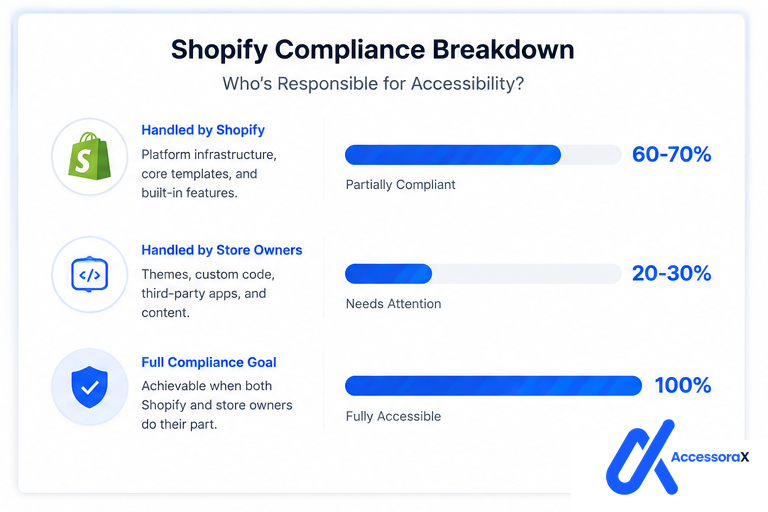
Shopify itself is partially compliant, but most Shopify stores are not.
This guide explains exactly what Shopify does right, what it gets wrong, and what YOU need to do to achieve full ADA compliance.
Quick Answer: Is Shopify ADA Compliant?
The short answer:
In plain English:
Shopify's platform gives you the tools to be accessible, but:
- Your theme might not be accessible
- Your customizations might break accessibility
- Your apps might introduce violations
- Your content might not follow best practices
Result: You need to do work to be compliant.
What Makes Shopify Partially Compliant
1. Shopify's Default Checkout IS Accessible
The good news:
Shopify's official checkout page (the one you get by default) is WCAG 2.1 Level AA compliant.
This means:
- Keyboard navigation works
- Form fields are properly labeled
- Color contrast is proper
- Mobile checkout is accessible
- Payment process is screen reader friendly
Why this matters:
Checkout is the most critical page on an e-commerce site. If checkout isn't accessible, disabled customers can't buy anything.
Shopify got this right.
Code example of what Shopify does right:
This is what accessibility-compliant code looks like.
2. Shopify's Core HTML Structure Is Sound
Shopify's default templates use proper HTML structure:
- Proper heading hierarchy (H1 → H2 → H3)
- Semantic HTML (using proper tags)
- List markup (for menus and lists)
- Navigation landmarks
- Skip-to-content links (on some themes)
Screen readers can understand Shopify stores because of this structure.
3. Mobile Responsiveness
Shopify themes are mobile-responsive by default.
This helps accessibility because:
- Mobile sites are simpler (fewer distractions)
- Touch targets are larger (easier to tap)
- Text resizes properly
Mobile users (especially those with low vision) benefit from responsive design.
4. Theme Options Exist
Shopify has accessibility-conscious themes available:
- Some themes are more accessible than others
- Shopify's own themes (Dawn, Debut) have better accessibility
- Third-party theme developers are improving accessibility
BUT: Most merchants use older, less-accessible themes.
What Makes Shopify Stores FAIL Accessibility
1. Theme Customization Breaks Accessibility
The problem:
Store owners customize their themes with:
- Custom CSS
- Custom JavaScript
- Custom color schemes
- Custom button styles
These customizations often break accessibility.
Example: Color Contrast Failure:
A store owner wants a sleek design with light gray text on white background.
Result: Low-vision users can't read the site.
This is a WCAG violation. Shopify didn't cause it: the customization did.
2. Third-Party Apps Break Accessibility
The problem:
Shopify apps (pop-ups, reviews, chat, etc.) often aren't accessible.
A store owner installs 8 apps:
- Pop-up app (not keyboard accessible)
- Review app (color contrast fails)
- Live chat (traps keyboard focus)
- Discount app (form labels missing)
- etc.
Result: 5 new accessibility violations introduced by apps.
This is not Shopify's fault: it's the apps' fault. But the store owner is liable.
3. Missing Alt Text on Product Images
The problem:
Shopify doesn't auto-generate alt text. Store owners add products without alt text.
Result: Blind customers can't see what products look like.
Example of bad alt text:
4. Poor Form Implementation
The problem:
Custom checkout or form elements often lack:
- Form field labels
- Clear error messages
- Proper input types
- Required field indicators
Result: Screen reader users don't know what to enter.
5. Navigation Not Keyboard Accessible
The problem:
Mega menus, dropdown navigations often:
- Only work with mouse hover
- Can't be opened with keyboard
- Trap keyboard focus
- Don't announce to screen readers
Result: Keyboard users can't navigate the site.
6. Color as Only Indicator
The problem:
Store owners use color to convey information:
- "In Stock" (just green)
- "Sale Price" (just red)
- "Disabled Button" (just gray)
Colorblind users can't tell what's what.
Violates WCAG 1.4.1 (Use of Color)
7. No Video Captions
The problem:
Store owners upload product videos without captions. Deaf users can't watch the videos.
Missing captions = WCAG 1.2.1 violation.
Real-World Example: Why Most Shopify Stores Fail
Let's audit a real Shopify store:
Store: Sells eco-friendly products
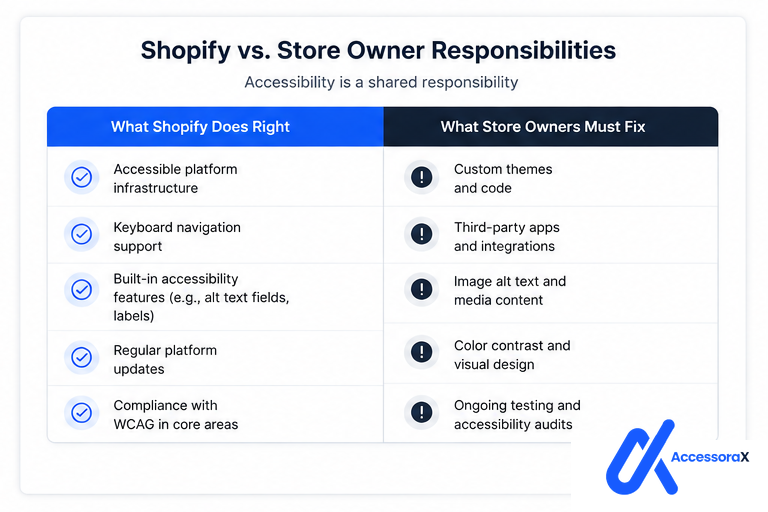
What Shopify provides (accessible)
- Proper checkout
- Product page structure
- Mobile responsive design
- Basic HTML structure
What the store owner added (NOT accessible)
- Bright green product titles on light green background (color contrast fails)
- Product images with no alt text (40 products, 0 alt text)
- Pop-up discount code (keyboard trap)
- Review app (color contrast fails)
- Live chat widget (traps focus)
- "Add to Cart" button with no keyboard activation
- Newsletter signup form with no labels
- Product videos with no captions
Result: 50+ accessibility violations
Shopify's fault: 0%
Store owner's fault: 100%
This is why most Shopify stores fail compliance.
How Shopify Compares to Other Platforms
Shopify vs WordPress (WooCommerce)
| Shopify | WordPress WooCommerce |
|---|---|
| Better accessibility out-of-the-box | More flexibility but less accessible |
| Easier to keep compliant | Requires more manual accessibility work |
| Limited customization (less chance to break things) | Can become very inaccessible if poorly built |
Winner for accessibility: Shopify
Shopify vs BigCommerce
| Shopify | BigCommerce |
|---|---|
| Better default accessibility | More powerful but less accessible by default |
| Easier to use | Requires more technical expertise |
| Fewer customization options | Can be highly accessible if properly configured |
Winner for accessibility: Shopify
Shopify vs Wix/Squarespace
| Shopify | Wix / Squarespace |
|---|---|
| More developer-friendly | Simpler but less accessible |
| Better accessibility options | Limited accessibility customization |
| More control | Platform limitations |
Winner for accessibility: Shopify
Conclusion: Shopify is actually one of the better e-commerce platforms for accessibility.
But store owners still need to do the work to achieve compliance.
The Real Answer: Is YOUR Shopify Store ADA Compliant?
Probably not.
Here's why:
If your store has:
- Any third-party apps
- Custom CSS or JavaScript
- Product images without alt text
- Custom forms or checkout
- Custom color scheme
- Video content
- Custom navigation
Then you have accessibility violations.
The only way to know for sure: Professional accessibility audit.
How to Make Your Shopify Store ADA Compliant
Step 1: Audit Your Store
First, you need to know what's broken.
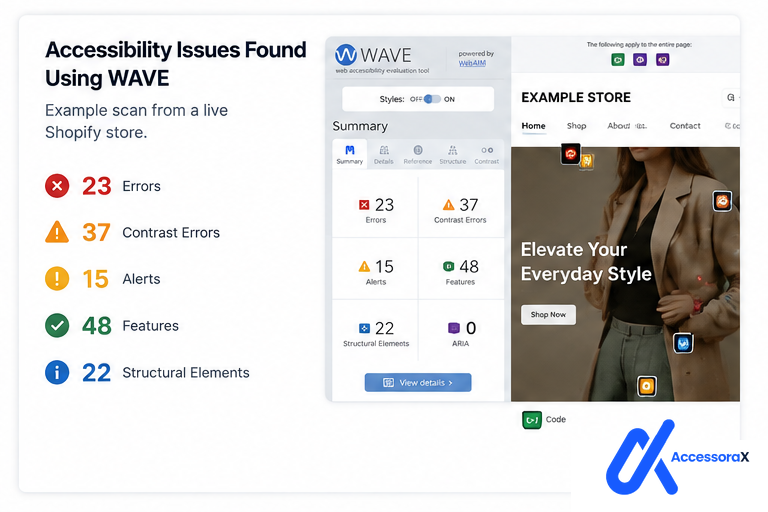
Free audit: Use WAVE extension
- Install: webaim.org/wave
- Scan your store
- See red violations
Professional audit: Get detailed report
- Expert identifies all issues
- Prioritizes by severity
- Provides fix recommendations
Get a free professional audit of your store →
Step 2: Prioritize Fixes
Not all violations are equally important.
Critical Fix immediately
- Keyboard navigation broken
- Form fields without labels
- No product image alt text
- Payment process inaccessible
High Fix within 1 month
- Color contrast failures
- Navigation not keyboard accessible
- Missing video captions
Medium Fix within 3 months
- Heading hierarchy issues
- Link context problems
- Minor structure issues
Step 3: Fix Issues
- Time: 20-50 hours
- Cost: $0-500
- Result: ~70% compliant
- Risk: Might miss issues
- Time: 0 hours (done for you)
- Cost: $199-500
- Result: 100% WCAG 2.1 AA compliant
- Risk: Low
- Time: 5 hours (you learn, professional fixes)
- Cost: $300-700
- Result: 100% compliant + you understand it
- Risk: Low
View our Shopify accessibility services →
Step 4: Verify Compliance
After fixes:
- Re-audit with WAVE
- Test with keyboard only
- Get professional verification
- Document everything
Common Misconceptions About Shopify ADA Compliance
Misconception 1: "Shopify Takes Care of Everything"
False. Shopify provides the foundation. YOU have to build on it properly.
Misconception 2: "Accessibility Widgets Make You Compliant"
False. Courts have ruled that accessibility overlays/widgets:
- Don't actually improve accessibility
- Create false sense of compliance
- May increase liability (courts see it as admission of problem)
Don't use them.
Misconception 3: "I Don't Have Disabled Customers So I Don't Need to Comply"
False. Two problems with this thinking:
- 61 million Americans have disabilities. You might have more than you think.
- ADA lawsuits happen regardless. Over 5,200 in 2025. Average cost: $25,000-$60,000.
Lawsuits aren't always from customers. Sometimes from lawyers looking for violations.
Misconception 4: "Compliance is Too Expensive"
False.
Compliance costs: $200-$1,000
Lawsuit costs: $25,000-$60,000
The math is obvious.
Misconception 5: "I'll Fix It Later"
Risky. Every month you wait:
- Lawsuits increase (trend is accelerating)
- Your liability grows
- Competitors get ahead
Better to fix proactively now.
Legal Reality: Why Shopify ADA Compliance Matters
The Law
Under Title III of the Americans with Disabilities Act (ADA):
"No individual shall be discriminated against on the basis of disability in the full and equal enjoyment of the goods, services, facilities, privileges, advantages, or accommodations of any place of public accommodation."
E-commerce websites are public accommodations.
Not being accessible = discrimination under the law.
The Standard
Courts use WCAG 2.1 Level AA as the standard for ADA compliance.
If your site doesn't meet this standard, you're violating federal law.
The Enforcement
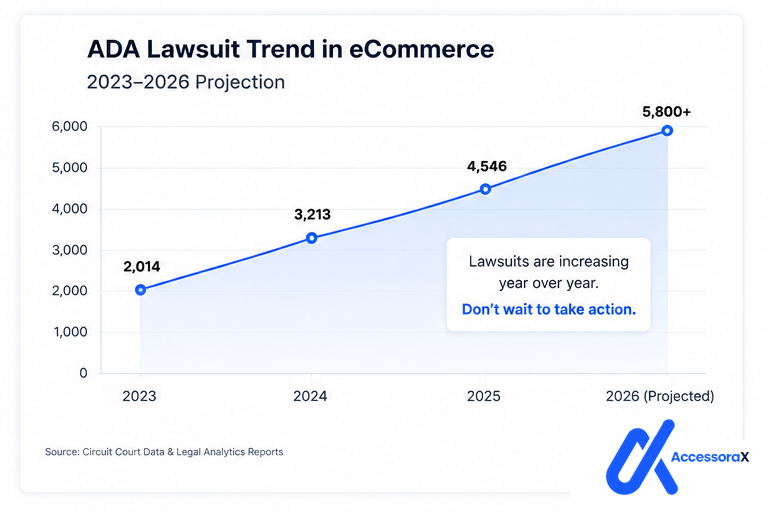
ADA lawsuits are increasing:
- 2023: 3,500 digital accessibility lawsuits
- 2024: 4,500 digital accessibility lawsuits
- 2025: 5,200+ digital accessibility lawsuits
- 2026: Trend continues
Most lawsuits target small businesses:
Why? Because they:
- Can't afford defense
- More likely to settle
- Often have obvious violations
Average settlement
$15,000-$35,000 (just the settlement, not legal fees)
Add legal fees ($10,000-$25,000): Total $25,000-$60,000
Know your exact compliance status
Our free audit uses the same WCAG 2.1 standards courts use in lawsuits. You'll get a detailed report showing exactly what's wrong and how to fix it.
Get your free Shopify accessibility audit →Your Shopify ADA Compliance Checklist
Before you can confidently say "my store is ADA compliant," verify:
Content accessibility
- All product images have descriptive alt text
- All videos have captions
- All audio content has transcripts
- All PDFs are accessible
Visual accessibility
- Text color contrast is 4.5:1 or higher
- Information is not conveyed by color alone
- Text can be resized to 200%
- No flashing content (more than 3 times/second)
Keyboard navigation
- All page elements reachable with Tab key
- No keyboard traps
- Dropdown menus work with keyboard
- Checkout accessible with keyboard only
- No mouse required for any function
Forms
- All form fields have visible labels
- Required fields clearly indicated
- Error messages clear and helpful
- Form validation doesn't break keyboard navigation
Navigation
- Clear navigation structure
- Skip links available
- Consistent navigation across pages
- Current page indicator visible
Code quality
- Valid HTML (no broken code)
- Proper heading hierarchy (H1 → H2 → H3)
- ARIA used correctly (when needed)
- Semantic HTML used properly
Mobile
- Touch targets at least 44x44 pixels
- Mobile navigation keyboard accessible
- Zoom works properly
- Accessible on small screens
Next Steps
If you're worried about ADA compliance:
- Know your current status: Get an audit
- Prioritize fixes: Fix critical issues first
- Implement fixes: DIY or professional
- Verify: Re-audit after fixes
- Maintain: Keep compliance as you update
The cost of NOT doing this
- Risk of lawsuit: $25,000-$60,000
- Risk of brand damage: Priceless
- Risk of losing customers: Real
The cost of doing this
- Professional audit: $200-$300
- Professional remediation: $199-$500
- Total: $400-$800
The math is clear.
Summary: Is Your Shopify Store ADA Compliant?
Answer: Probably not.
Why: Because Shopify provides the tools, but YOU have to use them correctly.
What to do:
- Audit your store (free or professional)
- Fix critical issues first
- Achieve full WCAG 2.1 Level AA compliance
- Document everything
- Maintain compliance as you update
Cost: $400-$1,000
Cost of not doing this: $25,000-$60,000 (lawsuit)
The choice is yours.
But the longer you wait, the bigger your risk.
Ready to stop worrying about ADA compliance?
We handle the technical work. You get peace of mind. Professional remediation: Full WCAG 2.1 AA compliance in 10-14 days.
View our Shopify accessibility services →Want to understand WCAG compliance better?
Read our complete WCAG 2.1 requirements guide →
This explains exactly what Google's algorithms and courts look for.
Questions About Shopify ADA Compliance?
Or book a consultation → to discuss your specific situation.